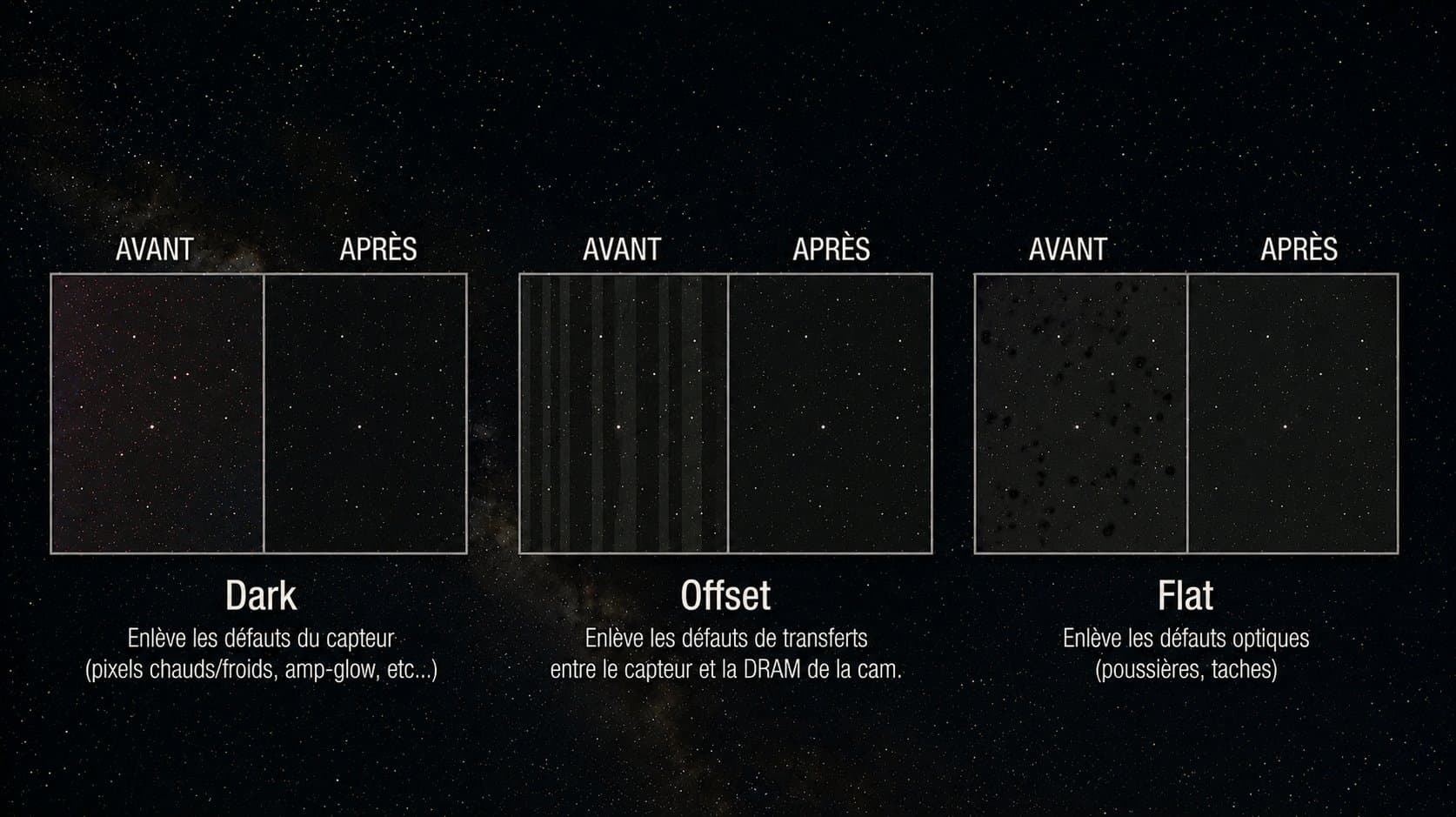
You finally have a clear night, you stack up the exposures, and in the morning you launch the stacking process... only to find your final image covered in dust halos, darkened corners, and persistent hot pixels. The instinct is to blame the optics or the sky. In the vast majority of cases, the real culprit is elsewhere: your calibration frames, the darks, offsets, and flats, are missing, poorly captured, or incorrectly applied.
These frames are not an administrative formality in astrophotography. They are what separates a dirty raw sub from a clean, usable image. In this article, the Doc walks you through exactly what each frame corrects, and above all which classic mistakes reintroduce the very defects you thought you had eliminated.
Key takeaways |
|---|
1. Each frame targets a specific defect: the dark removes thermal signal and the dark pattern, the offset (or bias) captures the read pedestal, and the flat corrects vignetting and dust. None of them replaces the others. |
2. A poorly made frame does not correct a defect: it injects a new one. A dark taken at the wrong temperature, a flat with an outdated dust map, and you end up with a mismatched dark or a mismatched flat that degrades the image instead of cleaning it. |
3. Calibration frames do not do everything. They remove neither light pollution gradients nor walking noise. Confusing their role with dithering or gradient removal is the most widespread mistake. |
What are calibration frames in astrophotography?
A raw sub-exposure (a "light") does not contain only the signal from your celestial target. It also carries a whole stack of spurious signals added by your sensor and your optical train: an electronic pedestal, thermal signal, pixel defects, edge dimming, and dust. Calibration means measuring these spurious signals separately, then subtracting them mathematically from each light.
To do this, three families of frames are captured, the darks, offsets, and flats, plus a combined result called a master (the stacked average of several frames of the same type, which reduces their own noise).
The dark: removing what the sensor generates in the dark
A dark frame is taken with the instrument fully covered (cap on), at exactly the same exposure duration, gain, and temperature as your lights. It records everything your sensor generates without any photons: dark current, which grows with duration and temperature, the static dark pattern, hot and cold pixels, amp glow (the luminescence halo in a corner caused by the sensor electronics), and the thermal component of FPN / fixed pattern noise, known as DSNU.
The offset (bias): capturing the read floor
The offset, or bias, is the shortest possible exposure (the sensor's minimum duration), taken with the cap on. It measures the pedestal that the electronics add to every readout, independently of any exposure: the bias pattern and the read noise floor. This is a reference value that the sensor intentionally places above zero to avoid clipping low values. The offset primarily serves to correctly calibrate the flats and, on CCD sensors, to scale the darks. An unstable bias is also one of the possible sources of banding.
The flat (flat frame): correcting the light path
The flat is captured by photographing a perfectly uniform light source through your entire optical train, without changing anything in your setup. It records how light is attenuated or distorted along its path: vignetting (corner darkening), dust donuts (those fuzzy rings caused by dust on the sensor or filters), and PRNU, meaning pixel-to-pixel sensitivity differences.
Which defects darks, offsets, and flats correct
Here is the map, frame by frame. This is the heart of the subject: knowing precisely what you are correcting, and therefore not expecting one frame to do the work of another.
Frame | Defects corrected or prevented | Classic mistake |
|---|---|---|
Dark | Thermal signal, dark current, hot/cold pixels, amp glow, thermal FPN (DSNU) | Temperature, duration, or gain different from the lights |
Offset (bias) | Read pedestal, bias pattern; flat calibration and dark scaling | Inconsistent gain/offset, or unstable bias not replaced by flat-darks |
Flat | Vignetting, dust donuts, optical train gradient, PRNU | Setup changed between flat and light, or exposure not set correctly |
The dark: guardian of the dark zones
The dark tackles everything that pollutes your sky background without depending on light. By subtracting the master dark, you erase the static dark pattern, neutralize amp glow, and correct the majority of hot pixels. For a clean master, stack at least 20 to 30 darks: below that, the master dark carries its own noise, which you re-inject into every light. On modern cooled CMOS sensors, which regulate temperature to the tenth of a degree, the dark is very reproducible, as long as you respect the three-way match of duration, gain, and temperature.
The flat: guardian of uniformity
The flat handles everything that modulates light intensity across the sensor. Vignetting becomes a smooth, symmetrical gradient that dividing by the master flat levels out. Dust donuts are localized structures that only the flat can cleanly remove. A critical point: the flat must itself be calibrated with a flat-dark (a dark matching the flat's duration) or a bias, otherwise its own pedestal remains and you get a biased correction. Not sure what you are seeing in your corners or sky background? You can submit your image to the Doc's diagnostic tool to distinguish genuine residual vignetting from a sky gradient.
The calibration order: why it cannot be improvised
Calibration follows a precise formula, and reversing it gives nonsensical results. In simplified form:
(Light minus master Dark) divided by (master Flat minus master FlatDark or Bias)
In other words: first subtract from the light all the additive signal (the dark, which already includes the bias since it is taken in darkness), then divide by the flat, itself calibrated. Subtraction corrects what adds (thermal signal, pedestal), division corrects what multiplies (optical attenuation, sensitivity). This is why you cannot replace a flat with a dark or vice versa: they operate on different mathematical planes. Software such as Siril, PixInsight (via WeightedBatchPreprocessing), or AstroPixelProcessor handles this sequence for you, but you must supply the correct frames.
Mistakes to avoid, and the defects they reintroduce
This is where most images go wrong. A poorly made frame is often worse than no frame at all, because it adds a structured, coherent defect that the statistical rejection of stacking cannot filter out.
Dark frame mistakes
Temperature not identical to the lights. Dark current roughly doubles every 6 to 7 degrees Celsius. A dark taken at a different temperature under-corrects or over-corrects the thermal signal: you get a mismatched dark, which leaves residual hot pixels or digs "cold pixel" black holes where it has over-subtracted.
Different duration or gain. A master dark of 120 s applied to 300 s lights does not subtract the right amount of thermal signal. The same applies if the gain differs: amp glow and DSNU are no longer on the same scale.
Dark library reused outside its original conditions. Reusing a library is very convenient on a regulated cooled CMOS, but only if duration, gain, and target temperature are strictly the same. An aging library can also drift if new hot pixels have appeared.
Over-subtraction. On some CMOS sensors, subtracting a full dark reintroduces noise or banding; a scaled dark or the use of flat-darks may be preferable. Test this for your specific sensor.
Offset frame mistakes
Bias inconsistent with gain/offset setting. The bias must be taken at the same gain and sensor offset as the lights and flats, otherwise the subtracted pedestal is wrong.
Unstable bias. Many CMOS sensors produce a noisy or unstable bias at very short exposures. In that case, skip the standalone bias and calibrate your flats with flat-darks (darks matching the flat duration). This is one of the mechanical causes of banding when you insist on using a shaky bias.
Flat frame mistakes
Dust map or focus changed between flat and light. If you unmount the camera, refocus, rotate the sensor, or clean a dust speck between your lights and your flats, your dust map and vignetting profile no longer match. Result: a mismatched flat that leaves uncorrected donuts, or even creates "negative" donuts where it corrects a dust particle that is no longer there.
Exposure not set correctly. Aim for a histogram median around 1/3 to 1/2 of the sensor's dynamic range. A clipped (saturated) flat no longer contains vignetting information; a flat that is too faint is buried in read noise and corrects poorly.
Non-uniform panel. If your light source (panel, twilight sky, white T-shirt) is not uniform, the flat encodes that spurious gradient and re-injects it into your lights as a false correction.
Flats not redone after changes to the optical train. Any change to the optical path (filter, reducer, rotation) requires new flats. This is non-negotiable.
Common misconceptions to dispel
Three persistent beliefs cost astrophotographers a great deal of time. The Doc breaks them down one by one.
No, flats do not correct sky gradients
This is the most frequent mistake. A flat corrects the attenuation caused by your instrument (vignetting, dust), which is fixed and reproducible. A light pollution gradient or a lunar gradient is an additive signal from the sky that changes in direction and intensity depending on your pointing and the time of night. No flat can remove it. These gradients are handled in post-processing with dedicated tools such as GraXpert or the gradient removal functions in Siril and PixInsight.
No, darks do not suppress walking noise
Walking noise is not a defect that the dark erases. The dark removes the fixed pattern at its original position, but walking noise comes from that residual pattern sliding through the aligned stack when your mount drifts without dithering. The only remedy is dithering during acquisition, which randomizes the displacement. A perfect dark on a session without dithering will still leave you with worm-like streaks.
No, a single dark is not enough
Subtracting a single dark from your lights is counterproductive: that lone dark carries all its own random noise, which you transfer in full to every light. You need to stack at least around twenty darks for the master to be smooth. The same logic applies to offsets (50 to 100, since they are short and cheap to shoot) and flats (20 to 30).
Frame | Recommended count | Key setting |
|---|---|---|
Dark | 20 to 30+ | Duration, gain, temperature identical to lights |
Offset (bias) | 50 to 100 | Minimum exposure; same gain/offset as lights and flats |
Flat | 20 to 30 | Median at ~1/3 to 1/2 of dynamic range; uniform source |
Flat-dark | 20 to 30 | Same duration and gain as flats, taken in darkness |
FAQ: Darks, Offsets, and Flats in Astrophotography
Do I need darks if I already have flats and offsets?
Yes, the three frames correct different things. The dark removes thermal signal and the dark pattern, the offset captures the read pedestal, and the flat corrects optical attenuation. Skipping darks leaves dark current, hot pixels, and amp glow uncorrected. At very short exposures and low temperatures, the dark sometimes becomes negligible, but that is the exception, not the rule.
Can I reuse a dark library from another night?
Yes, provided the exposure duration, gain, and target temperature are strictly identical. This is the advantage of a regulated cooled CMOS. Check periodically that no new hot pixels have appeared, which would require regenerating the library. Reusing a dark outside these conditions creates a mismatched dark that degrades your images.
Bias or flat-dark to calibrate my flats?
If your sensor has a stable, clean bias, the bias is sufficient. Many CMOS sensors have an unstable bias at very short exposures: in that case, prefer flat-darks, meaning darks with the same duration as your flats. They capture the pedestal and the small thermal signal of the flat without the artifacts of an ultra-short exposure.
What exposure should I use for my flats?
Aim for a histogram median around 1/3 to 1/2 of the sensor's dynamic range, neither clipped nor buried in noise. On a 16-bit sensor (65,535 ADU), a target of around 20,000 to 30,000 ADU is a good starting point. Most acquisition software includes a flat assistant that calculates the duration automatically.
Do flats correct light pollution?
No, this is a common confusion. Flats correct vignetting and dust, fixed defects tied to your equipment. A light pollution gradient or a lunar gradient is an additive signal from the sky, varying with pointing direction and time of night. It is removed in post-processing with a gradient neutralization tool, never with a flat.
Why does my image look worse with calibration than without?
Almost always because of a mismatched frame. A dark taken at the wrong temperature that digs cold pixels, a flat with an outdated dust map, a bad bias that adds banding. Compare a calibrated and an uncalibrated stack to isolate the offending frame. You can also compare your case with annotated examples in the DocStellar diagnostic gallery.
Conclusion
Calibration frames are not an optional chore: they are the tools that transform a messy raw sub into usable signal. Keep the core logic in mind: each frame corrects one specific type of defect, and none does the work of another. The dark handles thermal signal and hot pixels, the offset handles the read pedestal, and the flat handles vignetting and dust.
Also remember that rigor matters more than quantity. A poorly made frame re-injects a structured defect that survives stacking. Respect the three-way match of duration, gain, and temperature for your darks, do not touch your optical train between flats and lights, and do not ask your calibration frames to fix a sky gradient or walking noise: that is not their job. If a defect persists and you are unsure of its origin, run a DocStellar diagnostic to identify it in seconds. Your next image will start on solid foundations.