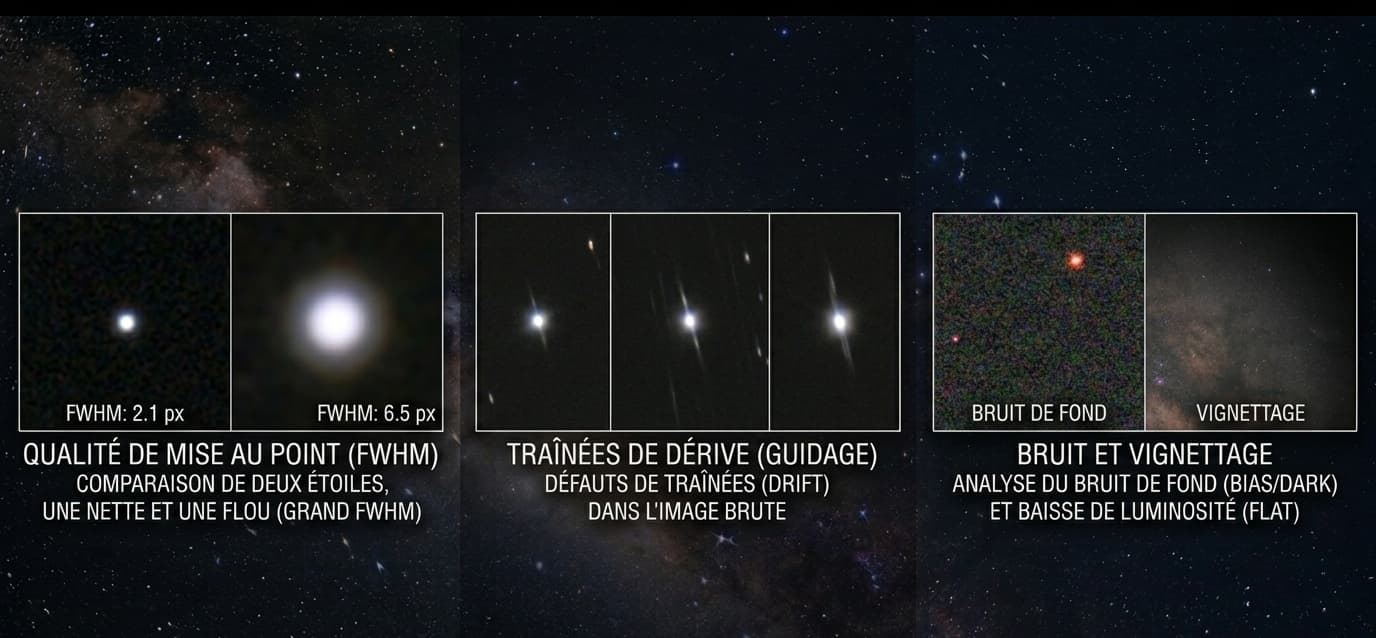
Stacking is not an act of magic: it is a weighted average. A mediocre sub integrated without care does not dissolve into the pile, it contaminates the final result. An elongated star, a saturated gradient, a satellite trail poorly rejected by the sigma-clipping algorithm: each of these defects leaves a visible signature after stacking, sometimes impossible to recover in post-processing.
Examining your subs before launching DeepSkyStacker or Siril serves three diagnostic objectives. First, identify the unrecoverable subs and discard them to avoid dragging the average down. Next, spot recurring defects that signal a hardware problem to fix in the field: a sensor tilt or a miscalibrated backfocus cannot be resolved in post-processing. Finally, calibrate your rejection rate for the next session: knowing that a night produced 40% unusable subs is a useful engineering data point.
The rule of thumb shared by most experienced astrophotographers: reject between 10 and 25% of the subs from a standard session. Below that, you are probably too lenient. Above that, it is the entire session you need to question.
FWHM, Eccentricity, SNR: the three metrics that matter
Three quantitative indicators concentrate the bulk of the objective diagnosis of a light frame. Learn to read them and the question how do I know if my sub is good gets a numerical answer rather than an intuitive one.
FWHM (Full Width at Half Maximum)
FWHM measures the width of a star at half the height of its luminosity profile, expressed in pixels or arcseconds. It is the sharpness indicator: the lower the value, the tighter the stars.
Short focal length setup (< 600 mm): aim for FWHM < 3.0'' under good skies, < 4.0'' acceptable.
Long focal length setup (> 1500 mm): 2.0 to 3.5'' depending on seeing.
Rejection threshold: any sub whose FWHM exceeds the session median by more than 25-30% is a candidate for rejection.
Eccentricity
Eccentricity quantifies star elongation on a scale from 0 (perfect circle) to 1 (line segment). Above 0.5, the elongation becomes visible to the eye. Above 0.6, the star is clearly stretched. A high and uniform eccentricity across the entire field points to a tracking drift or a guiding oscillation. A high eccentricity localized to the corners, on the other hand, implicates the optics: residual coma, tilt, or backfocus.
SNR (Signal-to-Noise Ratio)
SNR measures the ratio between useful signal and background noise. A passing cloud, a rising moon, a faint cirrus veil: all cause the SNR to drop without necessarily degrading star shape. Compare the SNR of each sub to the session median: a downward deviation of more than 30% flags a sub for manual review.
Visual inspection: gradient, halo, satellite, aircraft
Metrics do not catch everything. A quick visual inspection, sub by sub, remains essential. The most effective tool for this phase is Blink in PixInsight, or Siril's sequential preview function, which scrolls through subs like a filmstrip.
Background gradient: a mild light pollution gradient can be corrected in processing, but a gradient that saturates one side of the field, typical of a rising moon, makes background calibration impossible.
Linear trail: a thin satellite trail is generally eliminated by sigma rejection during stacking. An aircraft trail, wider and flickering, is not always.
Halos: a concentric halo around a bright star can reveal a moisture film on the corrector or a poorly coated filter.
Diffuse veil: cirrus invisible to the naked eye that translate into local loss of contrast and an uneven background.
Checking tracking: are the stars round?
Zoom to 200% on a central area of the field. Stars should be round, or at most show a uniform and subtle elongation. Three signatures to diagnose:
Stars elongated in the same direction across the entire field: right-ascension or declination drift, poor polar alignment, or an exposure time too long for the guiding performance.
Stars shaped like dots or dumbbells: guiding oscillation, typically a poorly tuned PID or declination backlash.
Round stars at the center, elongated toward the edges in radial or tangential patterns: that is no longer tracking, that is the optics.
The simple test: if the elongation pattern is identical at the center and in the corners, the cause is mechanical. If it diverges, the cause is optical.
Checking optics: are the corners clean?
Compare all four corners with each other and with the center. A healthy setup produces stars whose shape evolves symmetrically and progressively from the center toward the edges. Asymmetry or abrupt degradation signals a mechanical defect.
Three clean corners, one elongated corner: classic signature of sensor tilt.
Comma-shaped stars all around the perimeter, more pronounced at the extremes: uncorrected residual coma.
Slightly bloated and doubled stars in the corners, sharp center: incorrect backfocus, the spacing between corrector and sensor needs to be recalibrated.
Uniform blur across the entire field: defocus or degraded seeing. To discriminate between them, check whether FWHM varies sub to sub (seeing) or remains constant (focus).
Walking noise and amp glow: visible in the raw sub?
Two sensor noise signatures can be diagnosed directly from the raw sub, without waiting for the stacked result.
Walking noise, the pattern of hot pixels marching in a straight line through the stacked image, originates in the individual subs. On an isolated sub, it appears as a fine, directional granularity in the sky background, especially after an aggressive stretch in the preview. The typical cause: insufficient or absent dithering between exposures.
Amp glow appears as a warmer zone of brightness in a corner or along an edge of the sensor. On modern CMOS cameras it is generally controlled by darks. If you still see it after calibration, your darks do not match: the exposure duration, temperature, or gain differs, or the library is too old.
When to discard, when to keep
The question is this astrophoto sub usable or not has no binary answer. It is weighted by the context of the session.
Discard without hesitation
Stars doubled by a mount jump (never recoverable).
A thick aircraft or satellite trail across the main subject.
Clear defocus: FWHM 50% above the median.
Opaque cloud: collapsed SNR, locally saturated background.
Eccentricity > 0.7 across the entire field.
Keep even if imperfect
Mild gradient correctable in processing.
Eccentricity between 0.4 and 0.55 on a short session (some signal is better than no signal).
Thin satellite trail crossing an empty area: sigma clipping will handle it.
FWHM 10-15% above the median if SNR is good.
For borderline cases, the integration rule: a mediocre sub added to 80 good subs does not significantly degrade the stack. A mediocre sub added to 15 good subs does. The shorter your session, the more selective you need to be.
Automating the sort: tools and workflow
Manually inspecting 200 subs takes hours and leads to inconsistent judgments. A hybrid workflow, automatic weighting followed by targeted review, is faster and more reliable.
PixInsight SubframeSelector: the reference tool. Computes FWHM, eccentricity, SNR, star count, median, and MAD for each sub. Lets you define a combined weighting formula and export a weight file used by the integration process.
Siril: the Best Frame Selection function scores subs on equivalent criteria and lets you filter by FWHM or roundness before stacking.
ASTAP: fast command-line analysis, useful for scripting a pre-sort on large sessions.
Blink (PixInsight): for the visual phase after automatic filtering, on the subset of borderline subs.
Typical workflow: calibration (darks, flats, biases) then SubframeSelector or Best Frame Selection, then sorting by weighting formula, then Blink review of the bottom 10-15%, then final decision, then stacking. Allow 15 minutes for 200 subs once the routine is established.
Assisted diagnosis
Assessing the quality of a light frame requires a trained eye, especially to distinguish residual coma from an early tilt or walking noise from plain background granularity. If a defect resists your diagnosis, submit the sub to the Doc: the analysis identifies the visual signature and traces it back to the hardware or software cause. You can browse the public gallery of diagnoses to compare your signatures against documented cases.
Submit your sub to the Doc for a detailed diagnosis in under two minutes.